
Your website helps potential customers discover and trust your business. But slow pages, poor mobile design, and weak SEO can make visitors leave without contacting you. A website audit checklist for Indore businesses helps identify these problems and shows what needs improvement. Global DigiZone helps businesses improve their online presence through website development, SEO, and digital marketing services.
In this guide, you will learn about 15 common website issues, how to identify them, and how to fix them to improve website performance and customer enquiries.
Why Does Your Business Website Need an Audit?
A business website should do more than display your company name and services. It should help visitors understand what you offer, find useful information, and contact you easily.
Think about a person searching for a clinic in Vijay Nagar, a coaching institute in Bhawarkuan, a restaurant in Palasia, or a real estate company in Indore. They may visit several websites before choosing a business.
If your website loads slowly, has outdated information, or does not work properly on mobile, that visitor may choose another business.
A website audit reviews important areas such as:
- Website speed and technical performance
- Mobile responsiveness and accessibility
- Search engine optimization
- Content and heading structure
- Contact forms and enquiry buttons
- Local SEO and business information
- Website security and functionality
A regular audit helps you understand what is working, what needs attention, and which improvements should come first.
15 Website Issues That May Be Costing Your Business Customers
A. Website Speed and Technical Issues
1. Slow Website Loading Speed
Website speed affects how visitors experience your business website. If a page takes too long to load, visitors may leave before seeing your services.
Common reasons include large images, unnecessary plugins, poor hosting, unoptimized code, and excessive third-party scripts.
How to fix it:
Test your website using Google PageSpeed Insights. Review the mobile and desktop reports to identify performance problems.
Compress images, use WebP where suitable, remove unused plugins, enable caching, and review server response time.
Pay attention to Core Web Vitals:
- Largest Contentful Paint (LCP): loading performance
- Interaction to Next Paint (INP): responsiveness
- Cumulative Layout Shift (CLS): visual stability
Read Google’s Core Web Vitals documentation to understand these measurements.
For example, a restaurant website in Indore with large food images may need image compression and better page loading performance.
2. Poor Mobile-Friendly Design
Many people search for local services through smartphones. If your website does not fit smaller screens, visitors may struggle to read information or contact your business.
Common mobile problems include:
- Small text and buttons
- Images extending beyond the screen
- Difficult navigation menus
- Horizontal scrolling
- Forms that are hard to complete
How to fix it:
Use responsive web design and test important pages on different screen sizes. Make phone numbers clickable and keep enquiry buttons easy to find.
A coaching institute should make course details, admission information, and enquiry options easy to access on mobile.
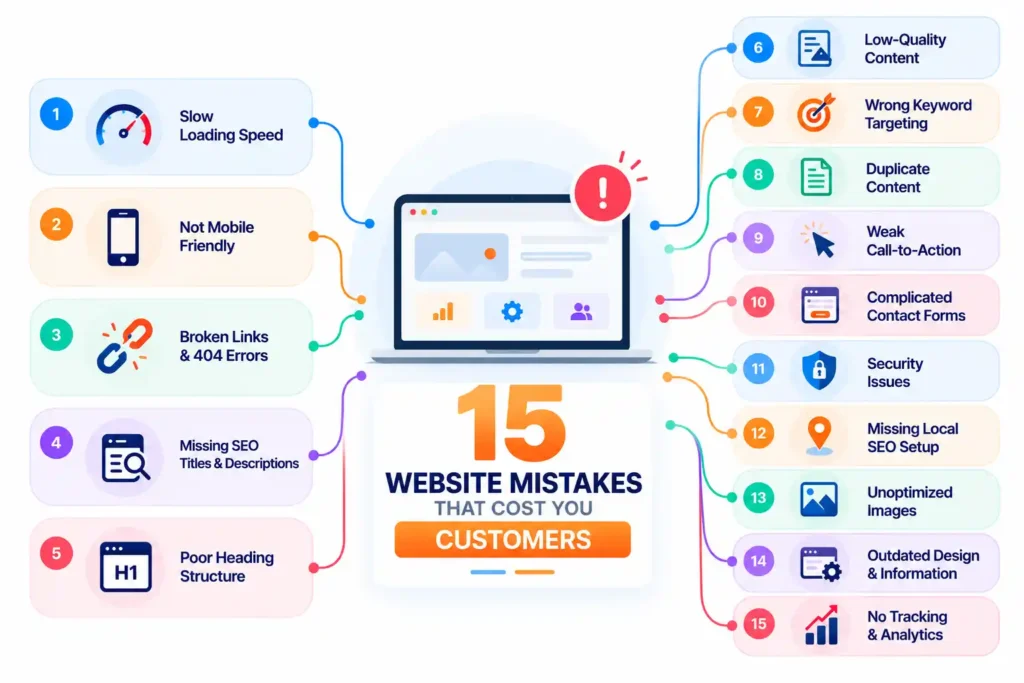
3. Broken Links and 404 Errors
Broken links take visitors to pages that no longer exist. They can also interrupt navigation and make important information difficult to access.
These errors may appear after changing URLs, deleting pages, or adding incorrect links.
How to fix it:
Review internal links, navigation menus, service pages, and important external links. Correct incorrect destinations and update links after changing a page URL.
If a page has permanently moved, use a relevant 301 redirect. Make sure your 404 page helps visitors return to useful sections of your website.
B. SEO and Google Visibility Issues
4. Missing or Poor SEO Titles and Meta Descriptions
SEO titles and meta descriptions help explain what a webpage contains. Duplicate, missing, or unclear titles may make it difficult for users to understand your pages in search results.
For example, a title such as “Home Page” does not explain whether the business provides website development, healthcare, or education services.
How to fix it:
Write unique and descriptive titles and meta descriptions for important pages. Include relevant keywords naturally and mention Indore when it makes sense.
Examples:
- Website Development Company in Indore
- SEO Services for Local Businesses
- Digital Marketing Agency in Indore
Avoid repeating the same keyword unnecessarily. Follow Google’s SEO Starter Guide for guidance on creating useful, search-friendly pages.
5. Incorrect Heading Structure and Keyword Targeting
Headings organize information and make content easier to scan. Poorly organized headings can confuse visitors and make the page topic less clear.
Keyword targeting is another common problem. Some websites repeat the same phrase many times instead of answering customer questions.
How to fix it:
Use clear and descriptive headings. Keep the main page topic easy to understand and arrange supporting sections with relevant subheadings.
Choose keywords based on customer search intent.
For example, a website development page targeting Indore can naturally cover responsive design, WordPress websites, business websites, website maintenance, and custom development.
Do not force keywords into every heading. Useful content should always come first.
6. Important Pages Not Indexed by Google
Your website may have useful service pages that do not appear in Google search results.
Possible reasons include incorrect noindex settings, robots.txt restrictions, crawl problems, duplicate URLs, and canonical tag issues.
How to fix it:
Use Google Search Console to inspect important URLs and review indexing reports.
Check your XML sitemap, canonical tags, robots.txt file, and internal links. Make sure important pages can be accessed by search engines.
Submitting a URL for indexing does not guarantee that Google will index it. Google makes the final decision.
C. Content and User Experience Issues
7. Thin, Outdated, or Duplicate Website Content
Website content should explain your services clearly and answer common customer questions.
A clinic website with only a few lines about its treatments may not provide enough information. Similarly, a coaching institute with outdated course details can confuse students and parents.
How to fix it:
Review important pages and add accurate, useful information.
Explain what your service includes, who it is suitable for, how your process works, and what customers should know before contacting you.
Add genuine project examples, relevant photographs, service details, and useful FAQs where appropriate.
Avoid copying content from other websites or adding unnecessary paragraphs just to increase word count.
8. Confusing Website Navigation
Visitors should be able to find important information without opening several unrelated pages.
A confusing menu can make it difficult to find services, course details, product information, or contact details.
How to fix it:
Keep your main navigation simple:
- Home
- About Us
- Services
- Portfolio
- Blog
- Contact Us
Use clear labels and link related pages naturally.
For example, a school website should make admissions, courses, facilities, and contact information easy to find.
9. Missing Clear Call-to-Action Buttons
Visitors may like your services but leave without contacting you if the next step is unclear.
A website should guide people towards an action such as calling, booking, requesting a quote, or sending an enquiry.
How to fix it:
Add clear call-to-action buttons such as:
- Call Now
- Request a Quote
- Book an Appointment
- Send an Enquiry
- WhatsApp Us
Place them near relevant service information and make sure every button works.
For a clinic, an appointment button should lead to a working booking form or contact option. For a real estate business, a property enquiry button should open the correct form or contact channel.
D. Lead Generation and Trust Issues
10. Complicated Contact Forms
Long contact forms can discourage visitors from submitting enquiries. Asking for unnecessary information may make the process frustrating.
How to fix it:
Keep forms short and request only useful details:
- Name
- Phone number
- Email address
- Service required
- Short message
Test forms on mobile and desktop. Check that enquiries reach the correct email address and that visitors see a confirmation message after submission.
11. Missing Customer Reviews and Testimonials
People often check customer feedback before choosing a local business.
If your website has no genuine reviews, testimonials, or project examples, visitors may have fewer reasons to trust your services.
How to fix it:
Add genuine customer feedback with permission. You can also link to your Google Business Profile so visitors can read public reviews.
A clinic may highlight patient feedback where permitted, while a website development company can show genuine project examples and client testimonials.
Never create fake reviews or make unsupported claims.
12. No Clear Business Information or Contact Details
Visitors should be able to identify your business and understand how to contact you.
Missing or outdated details can create confusion and affect customer trust.
How to fix it:
Make sure your website includes:
- Correct business name
- Working phone number
- Active email address
- Business address, where applicable
- Accurate service descriptions
- Business hours, where relevant
- Clear About Us and Contact Us pages
Keep important details consistent across your website, Google Business Profile, and relevant business listings.
For a local restaurant, this means checking the address, phone number, opening hours, and menu information. For a clinic, it also means keeping appointment and doctor details accurate.
E. Local SEO and Website Security Issues
13. Poor Local SEO Optimization for Indore Searches
If your business serves customers in Indore, your website should clearly explain where you operate and what services you provide.
A broad page targeting only “website development” may not address someone specifically searching for a website development company in Indore.
How to fix it:
Create useful service pages for your actual services and locations. Add relevant location information naturally to page titles, descriptions, content, and contact details.
Also maintain an accurate Google Business Profile and keep your business information updated.
For example:
- Website Development Services in Indore
- SEO Services in Indore
- Digital Marketing Agency in Indore
Global DigiZone provides SEO, local SEO, website development, and digital marketing services to help businesses improve their online presence.
Explore Global DigiZone’s Digital Marketing Services in Indore to learn about its services.
14. Inconsistent Business Information Across Online Platforms
Your business name, address, phone number, and other details should be accurate across your online presence.
For example, if a business has an old phone number on its website but a different number on Google Business Profile, customers may not know which one to use.
How to fix it:
Review your details on:
- Official website
- Google Business Profile
- Local business directories
- Social media profiles
- Relevant industry listings
Update old contact details, addresses, business hours, and service descriptions.
Consistent information helps customers find and contact your business without confusion.
15. Missing SSL Certificate or Website Security Problems
Website security protects your website and helps visitors feel more confident when sharing information.
An SSL/TLS certificate enables an encrypted HTTPS connection. Without a valid certificate, visitors may see browser warnings.
How to fix it:
Make sure your website uses HTTPS and has a valid certificate.
Also:
- Keep your CMS and plugins updated.
- Use strong administrator passwords.
- Remove unused themes and plugins.
- Take regular website backups.
- Use trusted hosting services.
- Check for suspicious activity.
If your website collects customer details through forms, take appropriate steps to protect that information.
Website Audit Checklist: What Should You Check First?
Use this checklist to review the most important parts of your website.
| Audit item | What to check |
| Website speed | Are important pages loading properly? |
| Mobile design | Does the website work on smartphones? |
| Core Web Vitals | Are LCP, INP, and CLS performing well? |
| SSL certificate | Does the website use HTTPS? |
| SEO titles | Are important pages using unique titles? |
| Meta descriptions | Are descriptions relevant? |
| Headings | Is the page content clearly organized? |
| Indexing | Are important pages indexed? |
| Broken links | Do important links work? |
| Images | Are images compressed and using useful alt text? |
| Schema markup | Is relevant structured data implemented correctly? |
| Contact forms | Can visitors submit enquiries? |
| CTA buttons | Are calls and enquiries easy to make? |
| Local SEO | Is business information accurate? |
| Security | Are software and backups maintained? |
You can also review accessibility. Check whether text has sufficient contrast, images have meaningful alternative text, forms have clear labels, and the website can be navigated using a keyboard.
How to Perform a Website Audit Step by Step
You can follow this simple process to identify common website problems.
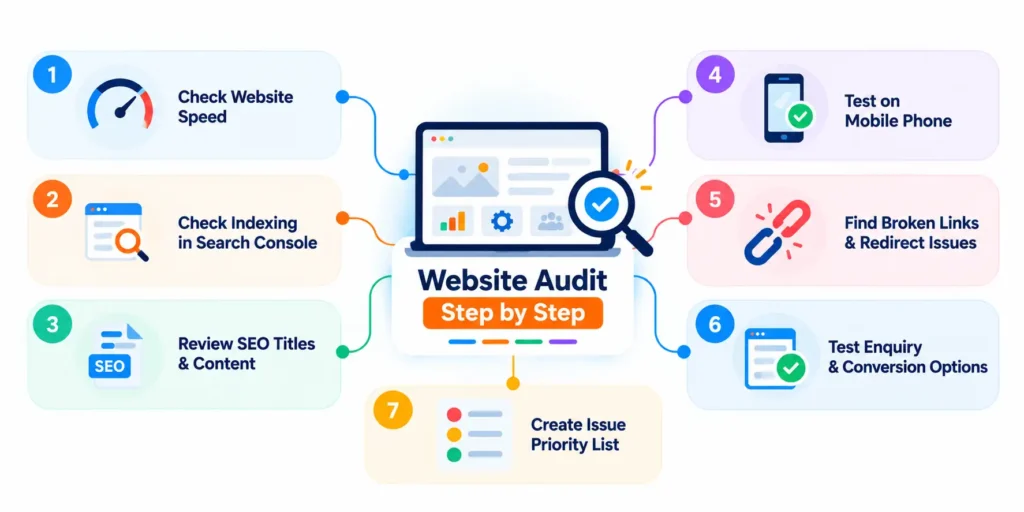
Step 1: Enter Your Website URL in a Speed Testing Tool
Open PageSpeed Insights and test your homepage and important service pages. Review mobile and desktop results separately.
Step 2: Check Indexing in Google Search Console
Inspect your main URLs and review indexing reports. Check whether important pages are accessible and included in your sitemap.
Step 3: Review SEO Titles and Page Content
Open your homepage, service pages, and location pages. Check titles, meta descriptions, headings, and whether the content answers customer questions.
Step 4: Test the Website on a Mobile Phone
Open the website on a real smartphone. Check the menu, images, text, buttons, phone links, and enquiry forms.
Step 5: Find Broken Links and Redirect Issues
Check internal links and important external links. Correct broken destinations and make sure moved pages redirect to relevant URLs.
Step 6: Test Enquiry and Conversion Options
Submit your contact form, click phone numbers, and test WhatsApp or booking buttons. Confirm that the actions work and enquiries reach the right destination.
Step 7: Prepare an Issue Priority List
Group problems into three levels:
- High priority: security warnings, broken forms, inaccessible pages, and major technical problems.
- Medium priority: slow pages, poor mobile experience, and important SEO issues.
- Low priority: minor design changes and small content improvements.
Fix the most important problems first. Repeat the checks after making major website changes.
How to Check Website Performance Using Free Tools
The following tools can help you understand different parts of your website.
Google PageSpeed Insights
Google PageSpeed Insights provides mobile and desktop performance reports. Use it to review loading performance, Core Web Vitals, and improvement suggestions.
Google Search Console
Google Search Console helps you review search clicks, impressions, queries, page indexing, and sitemap information.
Google Analytics 4
Google Analytics 4 helps you understand traffic sources, landing pages, and visitor interactions.
You can also measure important actions such as form submissions and phone link clicks when event tracking is configured correctly.
Test Your Website on Real Devices
Automated reports cannot replace real user testing. Open your website on smartphones, tablets, and desktop screens.
Try to complete a real customer journey: find a service, read the details, and submit an enquiry.
Global DigiZone recommends reviewing both technical reports and the actual customer experience when evaluating website performance.
How Global DigiZone Helps Indore Businesses Improve Their Websites
Identifying website problems is only the first step. You also need a practical plan to fix them.
Global DigiZone provides website development and digital marketing services for businesses that want to strengthen their online presence.
Website Design and Development
A business website should have a clear layout, responsive design, useful content, and simple navigation.
Global DigiZone provides website development services to help businesses build and improve their online presence. Explore Global DigiZone’s Website and Digital Marketing Solutions for more information.
SEO and Technical Website Optimization
Technical SEO includes website speed, indexing, crawlability, URL structure, and internal linking. On-page SEO focuses on page content, headings, titles, and search intent.
A well-planned SEO strategy helps make website pages easier for search engines and visitors to understand.
Local SEO for Better Google Visibility
Local SEO helps businesses reach people searching for services in their area.
For Indore businesses, this may include improving location-related service pages, maintaining accurate business information, and optimizing the Google Business Profile.
Google Ads and Social Media Marketing
SEO is useful for long-term organic visibility, while Google Ads can help businesses reach people actively searching for particular services.
Social media marketing can help businesses share useful content, build brand awareness, and connect with their target audience.
Global DigiZone offers SEO, Google Ads, social media marketing, website development, and lead generation services. The right combination depends on your business goals, audience, competition, and budget.
If you need help reviewing your website, contact Global DigiZone to discuss your website and digital marketing requirements.
Frequently Asked Questions About Website Audits
1. What Is a Website Audit?
A website audit reviews technical performance, SEO, content, security, and user experience to identify problems.
2. How Often Should a Business Website Be Audited?
Review important pages regularly and conduct a detailed audit every three to six months or after major website changes.
3. How Much Does a Website Audit Cost in Indore?
The cost depends on website size, technical complexity, and the depth of the audit. Ask for a clear scope before choosing a service.
4. Can a Website Audit Improve Google Rankings?
An audit identifies problems that may affect search performance. Fixing them can support SEO improvements, but rankings are not guaranteed.
5. Which Free Tools Can I Use to Audit My Website?
Google PageSpeed Insights, Google Search Console, and Google Analytics 4 are useful starting points.
Final Thoughts: Turn Your Website Into a Better Business Asset
Your website should help your business attract relevant visitors, explain your services, build trust, and generate enquiries. Slow pages, outdated content, poor mobile design, and technical SEO problems can affect that experience.
Use this checklist to review your website, test important functions, and identify areas that need attention. Fix the most important problems first and keep reviewing your website as your business grows.
If you are a business owner in Indore and need help with website development, SEO, or digital marketing, Global DigiZone can help you explore suitable solutions.
Contact Global DigiZone
Website: https://globaldigizone.com/
Phone: +91 9074793901 / +91 7440880257
Email: info@globaldigizone.com
Address: Swadesh Bhawan, Press Complex, Near Dainik Bhaskar, Indore, Madhya Pradesh – 452011
Get in touch with Global DigiZone and take the next step towards a better-performing business website.
SEOwithRishi