Google Ads helps local businesses reach people who are searching for their services. But getting clicks is not enough. You need relevant traffic, the right keywords, and a landing page that turns visitors into enquiries.
With the right Google Ads for Indore businesses strategy, you can attract potential customers and improve lead quality. Global DigiZone helps businesses with Google Ads management, campaign optimization, and lead generation.
Why Google Ads Is Important for Local Service Businesses
People often search on Google when they need a particular service. They may look for a dentist, taxi service, coaching institute, home repair expert, or digital marketing agency.
Google Ads gives businesses an opportunity to appear when potential customers search for relevant services.
For example, someone searching for “dentist near Vijay Nagar” may be looking for a nearby dental clinic. A well-planned search campaign can help that clinic reach the potential customer.
You can learn more about Google Ads and its advertising solutions before planning your campaign.
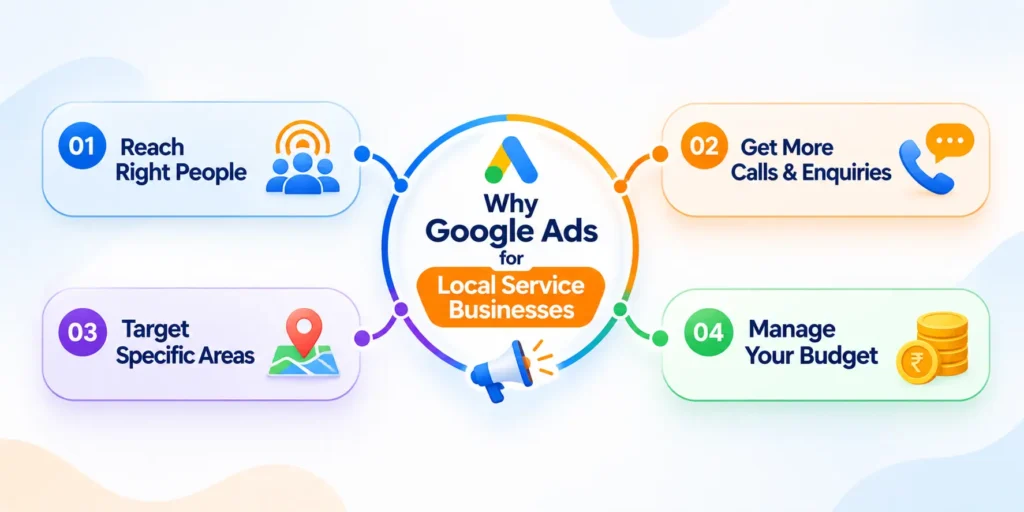
1. Reach People Who Are Already Searching
Google Ads connects your business with people who are actively looking for your products or services.
For example, people may search for:
- Best dentist in Indore
- AC repair service near me
- Taxi service in Indore
- Website development company in Indore
- Best coaching institute in Indore
These searches can show that a person has a specific requirement. By selecting relevant keywords and understanding search intent, your ads can reach people who are more likely to contact your business.
2. Generate Calls and Website Enquiries
Local service businesses often depend on phone calls, appointment bookings, and enquiry forms.
Google Ads can help you attract people who want to:
- Call your business
- Book an appointment
- Request a service
- Ask for a quotation
- Visit your website
- Submit an enquiry form
Your campaign should make the next step clear. If your main goal is phone calls, your ads and landing page should make it easy for customers to contact you.
3. Target the Right Service Areas
You do not always need to advertise across an entire city. You can select locations that are relevant to your business and service area.
For example, a business may want to reach customers in Vijay Nagar, Palasia, Bhawarkuan, Bengali Square, Rau, Nipania, or Annapurna Road.
Location targeting helps businesses focus their advertising on selected areas. The right locations depend on your service coverage and customer requirements.
Read Google’s location targeting guide to understand the available options.
4. Manage Your Advertising Budget
Google Ads allows businesses to set a daily budget and manage campaign spending.
You can start with a suitable budget, review campaign performance, and make changes based on actual results.
However, spending more does not automatically mean getting better leads. Your keywords, ads, landing page, location settings, and competition also affect campaign performance.
Why Your Google Ads Campaign May Not Be Generating Quality Leads
Many businesses run Google Ads but do not receive the enquiries they expect. Some get clicks without calls, while others receive enquiries from people who are not interested in their services.
This usually means that one or more parts of the campaign need improvement.
1. Choosing the Wrong Keywords
Keywords decide which searches can trigger your ads. If you select broad or unrelated keywords, your ads may reach people who are not looking for your service.
For example, a company offering professional website development may receive irrelevant traffic from searches related to free website builders, website design courses, or website templates.
You should select keywords that match your actual services and customer needs. Google’s keyword matching options explain how different keyword match types work.
2. Irrelevant Search Terms
Even when you add relevant keywords, your ads may appear for searches that are not useful to your business.
For example, a taxi service may not want clicks from people searching for taxi driver jobs, taxi driving courses, or free travel information.
Regularly checking the search terms report helps you identify irrelevant searches. You can then add suitable negative keywords to reduce unwanted traffic.
3. Poor Location Targeting
If your business serves only selected areas but your campaign targets a much wider location, you may receive clicks from people who cannot use your service.
Your location settings should match your actual service area. You should also review whether your campaign targets people physically present in your selected locations or people who show interest in them.
4. Weak Ad Copy
Your ad is often the first thing a potential customer sees. If it does not clearly explain your service, customers may ignore it or click without understanding what you offer.
A useful Google Ads headline should communicate:
- The main service
- The location
- A clear benefit
- A relevant call to action
For example, “Professional AC Repair in Indore” is more specific than a general headline such as “Best Services Available.”
5. Poor Landing Page Experience
Getting a click is only the first step. After clicking your ad, visitors should find the information they need.
If your website loads slowly, looks confusing on mobile, or hides contact details, visitors may leave without contacting you.
A good landing page should clearly explain your service and provide an easy way to call or submit an enquiry. Businesses can also explore Global DigiZone’s website and digital services to understand how a professional website supports online marketing.
6. Not Tracking Calls and Enquiries
Without proper conversion tracking, it can be difficult to understand which keywords and campaigns are generating useful leads.
You should track important actions such as:
- Phone calls from ads
- Calls made through your website
- Enquiry form submissions
- Appointment bookings
- Other meaningful lead actions
Tracking helps you understand campaign performance and make decisions based on useful data. Read Google’s conversion tracking guide to learn more.
How to Get More Qualified Leads from Google Ads
Getting better leads requires more than creating an advertisement. You need a clear strategy that connects the right audience with the right service.
Here are practical steps to improve your Google Ads lead generation campaigns.
1. Choose High-Intent Keywords
Start by understanding what your potential customers search for when they need your service.
High-intent keywords usually include a service, location, or action that shows a clear requirement.
For example:
| Business Type | Relevant Keyword Examples |
| Dental Clinic | Dentist in Indore, Dental Clinic Near Me |
| Taxi Service | Taxi Service in Indore, Indore to Bhopal Cab |
| Digital Marketing | Digital Marketing Agency in Indore |
| AC Repair | AC Repair Service in Indore |
| Coaching Institute | Coaching Classes in Indore |
You can also use phrases such as “book now,” “near me,” “service in Indore,” and “call for appointment” where they match the way customers search.
Do not select keywords only because they have high search volume. Focus on relevance, search intent, and the likelihood that the searcher needs your service.
2. Create Separate Ad Groups for Different Services
Avoid placing every keyword in one ad group.
If your business offers multiple services, create separate ad groups based on each service.
For example, a taxi company can create separate ad groups for:
- Outstation Taxi Service
- Airport Taxi Service
- Local Taxi Service
- Tempo Traveller
- Indore to Bhopal Cab
- Indore to Ujjain Taxi
This structure helps you write more relevant ads for each customer requirement.
A person searching for an airport taxi should see an ad related to airport transfers, not a general advertisement about every travel service.
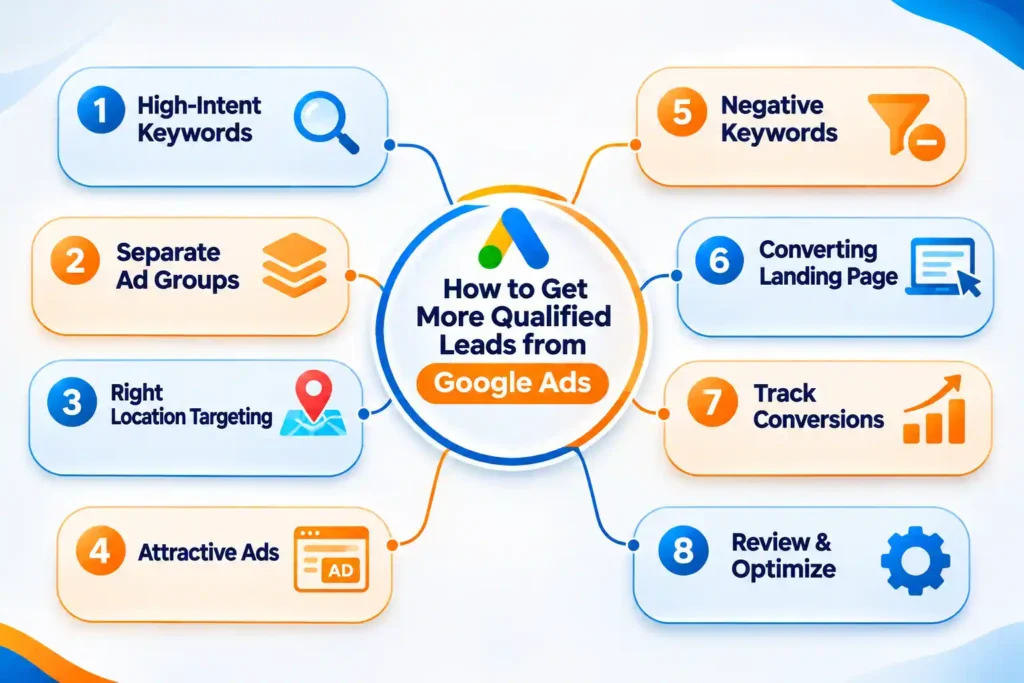
3. Target the Right Locations
Location targeting is important for local Google Ads campaigns.
Before selecting locations, understand where your customers are based and where your business can provide services.
For example:
- A dental clinic may target nearby residential areas.
- A taxi service may target customers across its service area.
- A home repair business may target areas within its service radius.
- A coaching institute may focus on locations near its centre.
You can use city, area, or radius targeting depending on your campaign and business needs.
Also, review location reports regularly. If certain areas are generating irrelevant traffic, consider adjusting your targeting.
4. Write Ads That Attract Genuine Customers
Your advertisement should explain what you offer and why a customer should contact you.
Avoid vague headlines. Use clear service-related words and a suitable location.
For example, a digital marketing agency can use headlines such as:
- Digital Marketing Agency in Indore
- Google Ads Management Services
- Generate More Business Enquiries
- Local SEO and Website Services
Your descriptions should explain your services in simple language.
You can also include useful details such as service availability, experience, consultation options, or business benefits, provided the claims are accurate.
Always use a clear call to action, such as:
- Call Today
- Request a Consultation
- Book an Appointment
- Get a Service Enquiry
5. Use Negative Keywords to Reduce Irrelevant Clicks
Negative keywords help prevent ads from appearing for searches that are not relevant to your business.
For example, a professional service provider may want to exclude searches related to:
- Jobs
- Salary
- Internship
- Free
- Course
- Training
- Tutorial
- DIY
- Meaning
- Definition
These are examples, not a universal negative keyword list. Some businesses may offer courses or training, so you should only exclude terms that are genuinely irrelevant.
Check the search terms report regularly and add negative keywords based on the actual searches triggering your ads.
6. Create a Landing Page That Converts Visitors
A landing page should give visitors a clear reason to contact your business.
It should match the service mentioned in your advertisement.
For example, if your ad promotes AC repair services, the landing page should focus on AC repair rather than showing unrelated services at the top.
Important landing page elements include:
- A clear service heading
- Short and useful service information
- Business phone number
- Click-to-call button
- Simple enquiry form
- Customer reviews or testimonials
- Service area details
- Relevant images
- Mobile-friendly layout
Keep the enquiry form short. Ask only for the information you need to contact the customer.
Your website should also load properly on mobile devices because many local customers search for services using their phones. Use Google PageSpeed Insights to check website performance and identify possible improvements.
7. Track Calls, Forms, and Qualified Enquiries
Do not judge campaign success only by the number of clicks.
A campaign may receive many clicks but very few genuine enquiries. Another campaign may receive fewer clicks but generate better business opportunities.
Set up conversion tracking for important actions such as phone calls, enquiry forms, and appointment bookings.
If possible, also record which enquiries become actual customers.-s
This helps you understand the difference between total leads and qualified leads. You can use Google Analytics alongside Google Ads to understand website activity and visitor behaviour.
Difference Between Qualified Leads and Irrelevant Leads
A qualified lead is a person who is genuinely interested in your service, needs what your business offers, and is more likely to become a customer. An irrelevant lead is someone who contacts your business but does not match your target audience, service requirements, location, or budget. Google Ads should focus not just on generating more enquiries but on attracting leads that have a real chance of becoming customers.
8. Review Search Terms and Optimize Campaigns Regularly
Google Ads requires regular monitoring. A campaign should not be left unchanged after setup.
Review the following information:
- Search terms
- Keyword performance
- Click-through rate
- Cost per click
- Conversion rate
- Calls and form submissions
- Location performance
- Device performance
- Cost per qualified lead
Use this information to improve your campaigns.
Pause or adjust keywords that spend money without producing useful results. Improve ads that receive impressions but few clicks. Review landing pages when visitors are clicking but not contacting you.
The goal is to make steady improvements based on actual campaign data.
Which Google Ads Campaign Type Is Best for Local Service Businesses?
Google Ads offers different campaign types. The right option depends on your business goals, services, audience, and available website or business information.
1. Google Search Ads
Search Ads are useful when customers actively search for a particular service.
For example:
- Best dentist in Indore
- Website development company in Indore
- Packers and movers near me
- AC repair service in Indore
These campaigns allow you to target relevant search queries through keyword and location settings.
For many local service businesses, Search Ads are a practical starting point because they can connect the business with people who are already looking for a service.
2. Performance Max Campaigns
Performance Max campaigns can show ads across multiple Google advertising channels using a goal-based approach.
They may be useful for businesses that want to reach customers across Google’s advertising inventory and have suitable conversion goals and campaign assets.
However, Performance Max is not automatically the best option for every local business. You should select a campaign type based on your objectives and ability to measure results.
You can read Google’s Performance Max campaign guide for more information.
3. Call-Focused Advertising
Some local businesses receive most of their enquiries through phone calls.
For these businesses, call-focused advertising options and call assets can make it easier for customers to contact the business directly.
Examples include:
- Taxi and travel services
- Emergency repair services
- Clinics
- Home maintenance services
- Local professional services
Make sure your business can answer calls during the advertised hours. Missed calls can result in lost opportunities.
Google Ads Strategy for Different Local Businesses
Every business has different customers and lead requirements. A strategy that works for a clinic may not work for a taxi company or coaching institute.
Here are some examples of how local businesses can plan their campaigns.
1. Clinics and Healthcare Services
Clinics can target people searching for specific treatments, consultations, and healthcare services.
Useful campaign practices include:
- Create separate campaigns or ad groups for relevant services.
- Use location-based keywords.
- Mention the clinic’s location clearly.
- Make appointment booking easy.
- Provide accurate service information.
- Follow applicable healthcare advertising policies.
Healthcare advertising requires special care. Avoid misleading claims, guaranteed treatment outcomes, or unsupported medical statements.
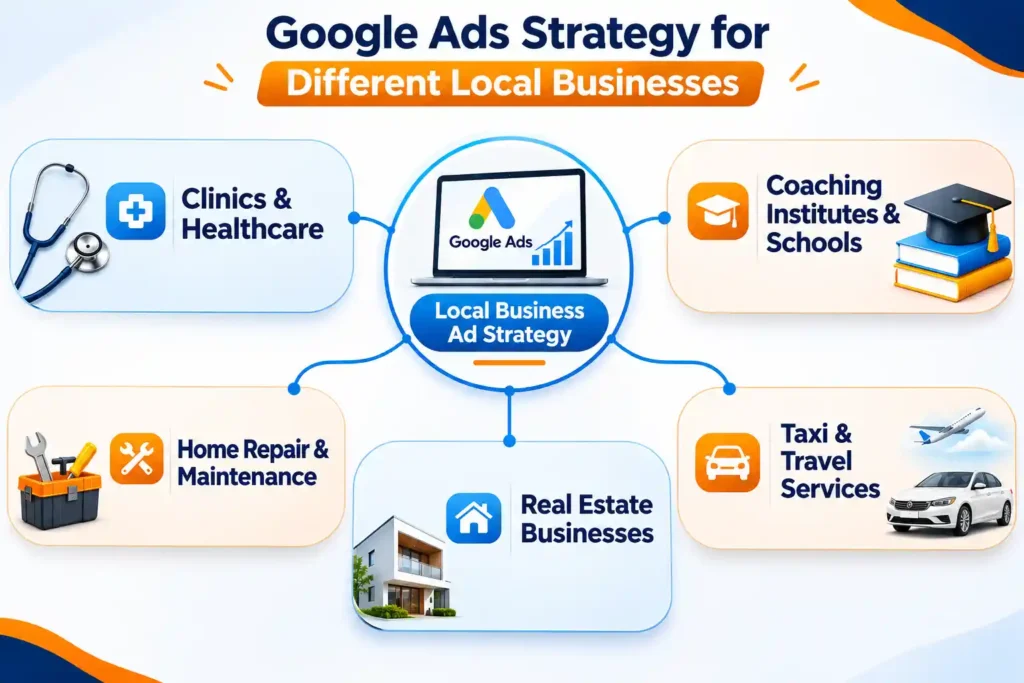
2. Coaching Institutes and Schools
Educational institutes can target students and parents who are searching for courses, admissions, and educational programmes.
Useful keyword themes may include:
- Coaching classes in Indore
- MBA college in Indore
- School admission in Indore
- Entrance exam coaching in Indore
Ads should clearly explain the course, admission details, location, and contact process.
3. Home Repair and Maintenance Services
Businesses offering plumbing, electrical, cleaning, pest control, or AC repair services can target people looking for immediate assistance.
A good campaign should focus on:
- Specific service keywords
- Areas covered by the business
- Clear contact information
- Relevant service landing pages
- Call tracking
For example, an AC repair company should create separate ad groups for AC repair, AC installation, and AC servicing if these are separate services.
4. Real Estate Businesses
Real estate companies can use Google Ads to reach people searching for properties, residential projects, commercial spaces, or property consultants.
Campaigns should focus on the property type, location, and relevant customer requirement.
Use accurate project details and avoid making claims about prices, returns, or availability unless they are verified.
5. Taxi and Travel Services
Taxi and travel businesses can target customers searching for local rides, airport transfers, and outstation trips.
For example:
- Indore Airport Taxi
- Indore to Ujjain Cab
- Indore to Bhopal Taxi
- Tempo Traveller in Indore
- Outstation Taxi Service in Indore
Create separate ad groups for important routes and services. Make sure your ads clearly explain the booking process and provide an easy way to call.
Also read : How to Get Your Business Recommended by ChatGPT and Google AI
How Much Budget Should Your Business Spend on Google Ads?
There is no single advertising budget that works for every business.
Your budget depends on several factors, including:
- Industry and competition
- Average cost per click
- Number of services
- Target locations
- Customer demand
- Campaign objectives
- Expected lead volume
A business with one local service may need a different budget from a company offering multiple services.
Start With a Practical Daily Budget
Choose a daily budget that your business can afford to test and manage.
Do not increase the budget only because you want more clicks. First check whether the campaign is reaching relevant people and generating useful enquiries.
Understand Cost Per Click and Cost Per Lead
Cost per click tells you how much you pay for an individual ad click on average.
Cost per lead tells you how much you spend to generate an enquiry.
However, the lowest cost per lead is not always the best result. Some enquiries may not match your services or may never become customers.
You should also consider the cost per qualified lead and the value of a new customer to your business.
Review Results Before Increasing Spending
Before increasing your advertising budget, check:
- Are the search terms relevant?
- Are the right locations generating enquiries?
- Are people calling or submitting forms?
- Are the leads relevant to your service?
- Is the landing page working properly?
Once you understand these points, you can make more informed budget decisions.
How Global DigiZone Helps Businesses Generate Qualified Leads
Running a successful Google Ads campaign requires planning, testing, and regular optimization. Simply creating an ad and setting a budget is not enough.
Global DigiZone helps local businesses improve their online advertising through practical digital marketing strategies.
As a digital marketing agency, Global DigiZone focuses on understanding each business, its services, target customers, and lead generation goals. Explore our digital marketing agency services to learn more.
1. Google Ads Campaign Planning and Setup
We help businesses plan campaigns based on their services and advertising goals.
This includes keyword research, campaign structure, location targeting, ad group planning, and suitable campaign settings.
2. Search Ads Management and Optimization
Our approach focuses on improving campaign relevance and reducing unnecessary advertising spend.
Campaign optimization may include:
- Keyword review
- Search term analysis
- Negative keyword updates
- Ad copy improvements
- Location adjustments
- Budget review
- Performance monitoring
3. Landing Page and Website Optimization
A good advertisement needs a useful landing page.
Global DigiZone also offers website development and website optimization services to help businesses create a better experience for visitors.
We focus on clear service information, mobile-friendly design, easy contact options, and relevant calls to action.
4. Lead Tracking and Performance Reporting
Understanding where your leads come from is important.
We help businesses focus on meaningful campaign actions such as phone calls and form submissions, wherever tracking can be properly implemented.
Performance reviews help identify what is working and what needs improvement.
5. Complete Digital Marketing Support
Apart from Google Ads management, Global DigiZone offers services such as:
- Search Engine Optimization (SEO)
- Local SEO and Google Business Profile optimization
- Website Development
- Social Media Management
- Meta Ads
- Lead Generation
- Graphic Designing
- Video Editing
Businesses can also explore our SEO services and search optimization guide to understand how organic search can support paid advertising.
If you want to improve your online advertising strategy, connect with Global DigiZone to discuss your business requirements.
Google Ads Checklist for Generating Quality Leads
Before launching or improving your campaign, use this simple checklist.
| Campaign Area | What to Check |
| Keywords | Are your keywords relevant to your services? |
| Search Terms | Are irrelevant searches excluded? |
| Location | Are you targeting the right service areas? |
| Ad Copy | Does your ad clearly explain your service? |
| Ad Groups | Are different services separated properly? |
| Negative Keywords | Have you excluded unwanted searches? |
| Landing Page | Does the page match your advertisement? |
| Mobile Experience | Can visitors easily use your website on mobile? |
| Contact Options | Are phone and enquiry options easy to find? |
| Conversion Tracking | Are calls and form submissions tracked? |
| Optimization | Are you reviewing campaign performance regularly? |
Use this checklist before launching a new campaign and during regular campaign reviews. For more practical website and marketing guidance, visit the Global DigiZone website.
Frequently Asked Questions
1. How do Google Ads generate leads?
Google Ads shows your business to people searching for relevant services. They can then call you or submit an enquiry through your website.
2. How much does Google Ads cost?
The cost depends on your industry, competition, keywords, location, and daily budget. There is no fixed cost for every business.
3. Which campaign type is best for local services?
Search Ads are often a practical starting point when customers actively search for a service. Other campaign types may suit different goals.
4. How can I reduce irrelevant clicks?
Use relevant keywords, review search terms, add negative keywords, and improve location targeting.
5. Why am I getting clicks but no calls?
Your keywords, ad copy, landing page, contact options, or audience targeting may need improvement.
6. Does my business need a website?
A website or landing page helps explain your services and gives customers a clear way to contact you. Some campaign options may work without a traditional website, depending on eligibility.
Final Thoughts: Generate Better Leads With the Right Google Ads Strategy
Google Ads can help local businesses reach potential customers, but success depends on the quality of your campaign.
Choosing relevant keywords, targeting the right locations, writing clear advertisements, building useful landing pages, and tracking enquiries can help improve campaign performance.
Do not focus only on getting more clicks. Focus on reaching people who genuinely need your services.
If your business is getting clicks but not enough useful enquiries, it may be time to review your campaign strategy.
Global DigiZone helps businesses with Google Ads management, SEO, Local SEO, website development, and other digital marketing services.
Contact us to discuss your requirements and plan a suitable digital marketing strategy.
Global DigiZone – Digital Marketing Agency
- Phone: +91 9074793901 / +91 7440880257
- Email: info@globaldigizone.com
- Website: globaldigizone.com
- Address: Swadesh Bhawan, Press Complex, Near Dainik Bhaskar, Indore, Madhya Pradesh – 452011
SEOwithRishi