Is your website not getting traffic from Google even after publishing blogs and creating new pages? The problem may be poor keyword targeting, indexing issues, weak content, or technical SEO errors.
The first step is to find out what is stopping your website from getting visitors. In this guide, Global DigiZone explains 11 common reasons for low organic traffic and practical ways to fix them.
1. Your Website Is Not Indexed by Google
If Google has not indexed your page, it generally cannot appear in organic search results. Your website may be live, but that does not mean Google has discovered and indexed every page.
How to Check Website Indexing
Open Google Search Console and use the URL Inspection tool to check an important page. You can also search site:yourdomain.com on Google for a quick indication of indexed pages.
How to Fix Indexing Issues
Check for these common problems:
- Accidental noindex tags.
- Important pages blocked by robots.txt.
- Missing or incorrect sitemap entries.
- Server errors or broken pages.
- Incorrect canonical tags.
- Pages that Google has not discovered through internal links.
Fix the reported issue first. Then request indexing through Google Search Console if appropriate. Remember that requesting indexing does not guarantee inclusion in search results.
For more information, visit the official Google Search Console Help.
2. You Are Targeting the Wrong Keywords
Your website may be indexed but still receive little traffic because you are targeting keywords that your potential customers rarely use or that do not match their needs.
For example, a digital marketing agency in Indore may get better-targeted visitors from searches such as “SEO agency in Indore” than from a broad term such as “marketing.”
How to Find Better Keywords
Research the phrases people use when looking for your services. Google Search Console, Google Trends, search suggestions, and keyword research tools can help.
Focus on three types of keywords:
- Informational: People looking for answers and guidance.
- Commercial: People comparing services or solutions.
- Local: People searching for services in a specific city or area.
Match each keyword to the right page. A blog should answer a question, while a service page should explain what you offer and how customers can contact you.
At Global DigiZone, keyword research should be connected to business goals, not just search volume. Relevant traffic is more valuable than visitors who have no interest in your services.
3. Your Website Pages Are Not Ranking Well
A page can be indexed and still appear too low in search results to attract visitors. This often happens when competing pages provide more relevant information or better answer the searcher’s question.
Check Your Google Search Performance
Open the Performance report in Google Search Console and review clicks, impressions, click-through rate (CTR), and average position.
Use these metrics to identify possible problems:
- High impressions, low clicks: Review your title and search snippet.
- Low impressions: Check search demand, indexing, and rankings.
- Declining clicks: Compare rankings, impressions, and CTR with an earlier period.
These patterns help identify possible causes, but they do not prove a problem on their own.
Also read : How to Rank Higher on Google Maps in India (2026 Guide)
Improve Your Pages
Write clear page titles and headings. Explain the topic directly and include relevant details that help readers make decisions. Review competing results to identify useful information your page may be missing.
Avoid repeating the same keyword in every paragraph. Use related terms naturally and make the page easy to read.
4. Your Content Does Not Answer Search Intent
Publishing more blogs does not automatically increase website traffic. Content must answer the questions people are actually asking.
For example, someone searching for “why is my website not getting traffic” needs practical troubleshooting steps, not a general introduction to digital marketing.
Create Useful, Original Content
Before writing a blog, identify the reader’s problem and the information they need to solve it.
Include practical steps, relevant examples, clear explanations, and links to trustworthy resources. Avoid unnecessary introductions, repeated points, and claims you cannot support.
Update Old Content When Needed
Review pages that receive few clicks or have lost traffic. Check whether the information is outdated, the search intent has changed, or important questions remain unanswered.
Update content when you can genuinely improve its usefulness. Simply changing the date or adding more words is not enough.
Follow Google’s SEO Starter Guide for guidance on creating helpful, search-friendly pages.
5. Your Website Has Technical SEO Problems
Technical SEO helps search engines discover, crawl, and understand your website. Errors can prevent important pages from appearing properly in search results.
Common Technical SEO Issues
Check your website for:
- Broken links and incorrect redirects.
- Pages returning unexpected 404 or server errors.
- Duplicate URLs and incorrect canonical tags.
- Important pages blocked from crawling.
- Accidental noindex instructions.
- Sitemap URLs that do not match the preferred page URLs.
How to Fix Them
Start with your most important service pages and blog posts. Check their status in Google Search Console, fix broken internal links, and make sure Google can access the pages you want indexed.
If a page has permanently moved, redirect it to the most relevant replacement where one exists. Do not redirect every broken URL to the homepage.
A technical SEO audit can help identify problems that are difficult to spot manually. Global DigiZone offers digital marketing and website-related services that can support businesses working to improve their search visibility.
6. Your Website Loads Slowly on Mobile
A slow website can frustrate visitors and make it harder for them to explore your services or submit an enquiry. Mobile usability matters because many customers browse websites on their phones.
Check Your Website Speed
Use Google PageSpeed Insights to test important pages and review its performance recommendations.
Pay attention to Core Web Vitals:
- LCP: How quickly the main content loads.
- INP: How quickly the page responds to interactions.
- CLS: How much the page layout shifts unexpectedly.
Improve Website Performance
Compress large images, remove unnecessary scripts, enable suitable caching, and review unused CSS or JavaScript. Check your hosting performance and test the website on mobile after making changes.
Do not assume speed is the only reason for low traffic. Content relevance, competition, indexing, and search demand also affect organic visibility.
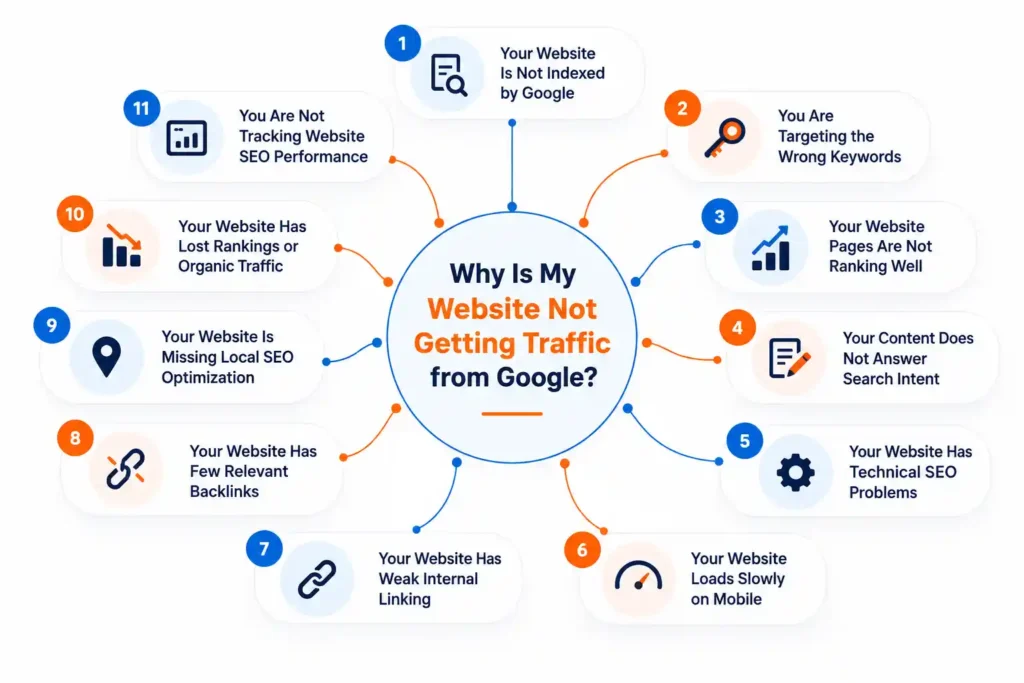
7. Your Website Has Weak Internal Linking
Internal links connect pages on the same website. They help visitors discover related information and help search engines understand how your pages are connected.
If an important service page has very few internal links, users may find it harder to discover.
How to Improve Internal Linking
Link related blogs to relevant service pages and connect articles that answer similar questions. Use descriptive anchor text so readers understand where a link will take them.
For example, an article about website traffic can link to a relevant SEO service page. A guide about website performance can link to a related website development page.
Global DigiZone should use this approach across its own blog and service content: every internal link should help readers find useful information or take a relevant next step.
Avoid linking every mention of SEO to the homepage. Link to the most relevant page available on your website.
8. Your Website Has Few Relevant Backlinks
Backlinks are links from other websites to yours. Relevant links can help people discover your business and may contribute to your website’s reputation.
However, more backlinks do not automatically mean better rankings. Low-quality link schemes can create risks.
How to Earn Relevant Backlinks
Create useful resources that other websites may want to reference. You can publish original research, practical guides, industry insights, or helpful tools.
Build genuine relationships with relevant businesses and industry websites. Participate in legitimate industry directories or local business communities where appropriate.
Avoid buying links solely to manipulate rankings or using automated packages that promise hundreds of backlinks.
A sustainable SEO strategy combines helpful content, sound technical practices, relevant links, and a good user experience. Backlinks alone cannot fix an otherwise weak website.
9. Your Website Is Missing Local SEO Optimization
If your business serves customers in a particular city, local SEO can help you reach people searching for relevant services in that area.
For example, a business serving Indore may want its website to appear for service-related searches that include the city name.
Target Local Keywords
Create useful service pages that explain what you offer and where you work. Include accurate location information where relevant.
Avoid creating many nearly identical city pages by changing only the location name. Each page should offer useful information for its intended audience.
Optimize Your Google Business Profile
If your business is eligible for a Google Business Profile, keep its information accurate. Choose the appropriate category, add relevant services, upload genuine photos, and respond professionally to customer reviews.
Your website and profile should provide consistent business information.
Build Local Search Visibility
Publish content that answers local customers’ questions and link it to relevant service pages. Keep your contact information easy to find.
Global DigiZone, based in Indore, helps businesses explore digital marketing and local SEO as part of their wider online growth strategy. Businesses can visit the Global DigiZone website to learn more about the company.
10. Your Website Has Lost Rankings or Organic Traffic
A website that previously received visitors but has recently lost traffic needs a different diagnosis from a new website that has never attracted visitors.
Do not immediately assume that a Google algorithm update caused the decline. First, check what changed.
Compare Your Search Console Data
Compare the affected period with an earlier period of similar length. Review clicks, impressions, CTR, average position, and the pages or queries affected.
Look for patterns:
- Falling impressions may indicate reduced visibility or search demand.
- Stable impressions with fewer clicks may indicate a CTR problem.
- Falling clicks and worsening positions may indicate ranking changes.
- A decline limited to one page may point to a page-specific issue.
Investigate Possible Causes
Check for recent website redesigns, changed URLs, broken redirects, server errors, accidental noindex tags, and significant content changes.
Also consider seasonality and changes in customer demand. If you suspect a Google Search incident, check the Google Search Status Dashboard.
Use evidence to decide what to fix rather than changing every page at once.
11. You Are Not Tracking Website SEO Performance
Without regular tracking, it is difficult to know whether your website is improving or why organic traffic remains low.
Two useful tools are Google Search Console and Google Analytics.
Use Google Search Console
Search Console shows how your website performs in Google Search. Review clicks, impressions, CTR, average position, indexing information, and relevant search queries.
Use this data to find pages that receive impressions but few clicks, or important pages that are not attracting the expected visibility.
Use Google Analytics
Google Analytics helps you understand what visitors do after arriving at your website. Depending on your setup, you can review organic sessions, landing pages, engagement, and conversions.
Track meaningful business actions, such as enquiry form submissions or purchases, where measurement is properly configured.
Traffic alone is not the only measure of success. A smaller number of relevant visitors can be more valuable than a large number of visitors who are unlikely to become customers.
Also read : Social Media Marketing Agency Near Me in Indore
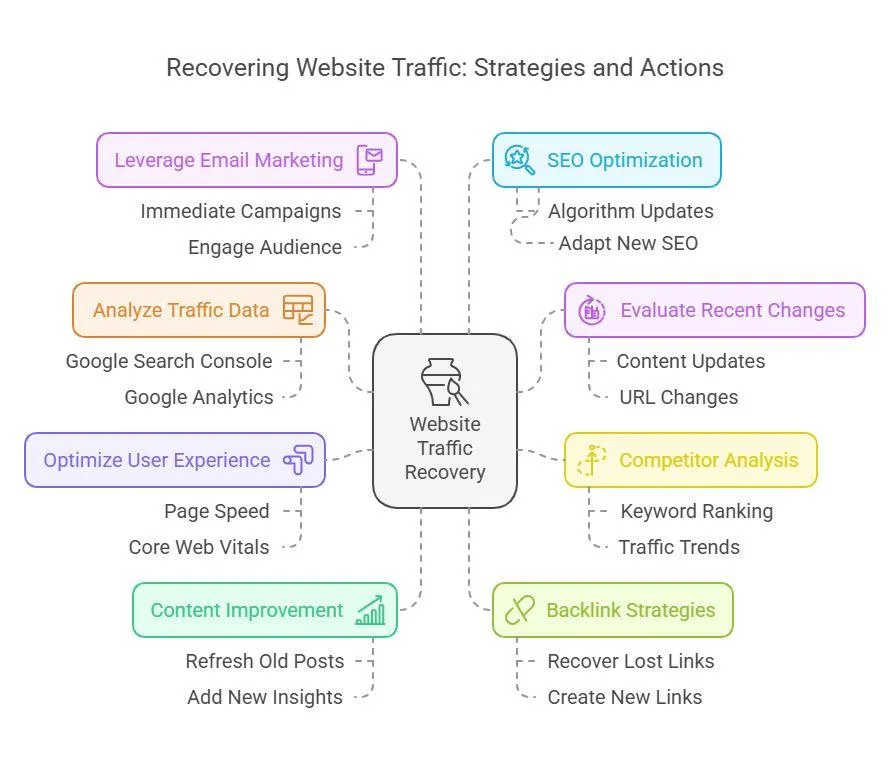
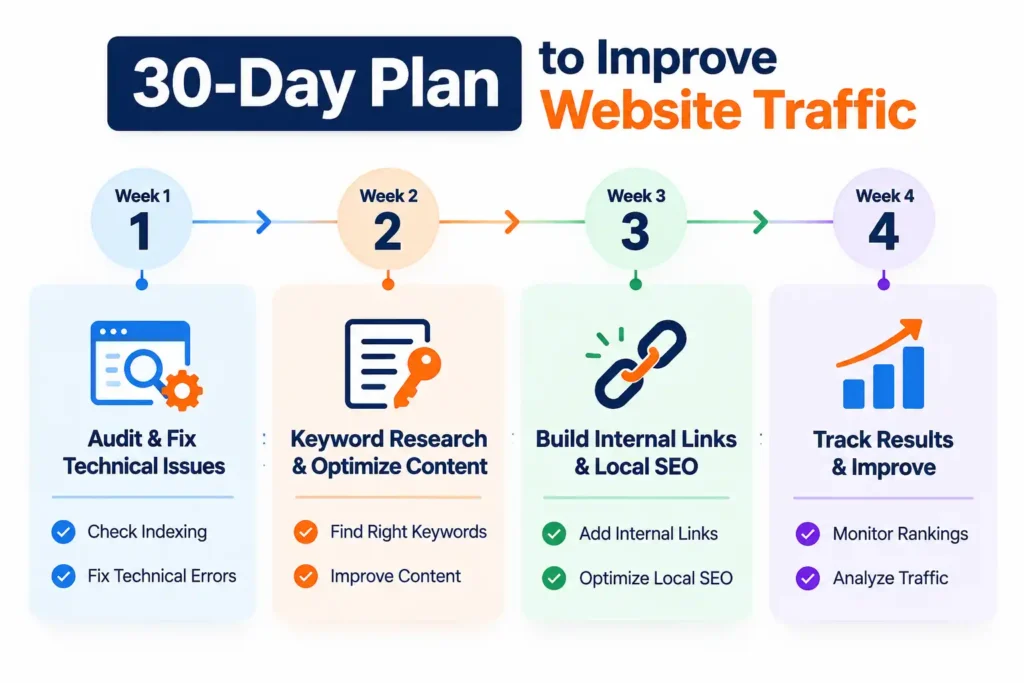
How to Fix a Website That Is Not Getting Traffic: A 30-Day Action Plan
You do not need to change everything at once. Start with the issues that affect your most important pages.
Week 1: Check Indexing and Technical Issues
- Review important URLs in Google Search Console.
- Check your sitemap, redirects, and indexing instructions.
- Fix broken links and major technical errors.
Week 2: Improve Keywords and Content
- Identify relevant search queries.
- Improve page titles, headings, and useful content.
- Update existing pages that have clear opportunities.
- Add relevant internal links.
Week 3: Improve Website Experience
- Test key pages on mobile.
- Review PageSpeed Insights recommendations.
- Check local service pages and your Google Business Profile, where applicable.
Week 4: Measure Progress
- Compare clicks, impressions, CTR, and rankings.
- Review the pages you updated.
- Track relevant enquiries and conversions.
- Decide which problems need further work.
This plan helps you organize your SEO work, but it does not guarantee ranking improvements within 30 days. SEO results depend on your website, competition, search demand, and the changes made.
How Global DigiZone Can Help Improve Your Website Traffic
Low website traffic can have several causes at once. You may need to improve technical SEO, target more relevant keywords, update existing content, or make your website easier to use.
Global DigiZone provides digital marketing services designed to help businesses improve their online presence. The right starting point is to understand your website’s current problems and identify improvements that support your business goals.
Website SEO Audit and Technical SEO
Review indexing issues, broken links, page structure, technical errors, and other problems that may affect search visibility.
Keyword Research and Content Optimization
Identify relevant search terms and improve existing pages so they answer customers’ questions more clearly.
Website Development and Performance
Improve website usability, mobile experience, page structure, and other aspects of the website that help visitors find information and contact your business.
Local SEO and Digital Marketing
Improve local search visibility with relevant service pages, accurate business information, and a suitable Google Business Profile where eligible. Other digital marketing channels can complement SEO when they match your goals.
Why Work With Global DigiZone?
Rather than relying on random keyword changes or publishing blogs without a plan, businesses need a clear approach based on their website’s actual performance.
Global DigiZone can help businesses review their SEO requirements, prioritize improvements, and build a practical digital marketing strategy. The goal is to improve relevant visibility and attract potential customers, not simply increase visitor numbers.
Also read : What’s the Future of Digital Marketing with AI Tools Like ChatGPT?
Contact : Global DigiZone
Website: globaldigizone.com
Phone: +91 9074793901 / +91 7440880257
Email: info@globaldigizone.com
Address: Swadesh Bhawan, Press Complex, Near Dainik Bhaskar, Indore, Madhya Pradesh – 452011.
Contact Global DigiZone to discuss your website, SEO requirements, and the next steps for improving your online visibility.
Frequently Asked Questions
1. Why is my website not getting traffic from Google?
Common reasons include indexing problems, poor keyword targeting, low rankings, technical errors, and content that does not match search intent. Use Google Search Console to investigate before choosing a solution.
2. How do I check whether Google has indexed my website?
Use the URL Inspection tool in Google Search Console to check an individual page. A site:yourdomain.com search can provide a quick indication, but it is not a complete indexing report.
3. How long does SEO take to increase website traffic?
There is no fixed timeline. Results depend on competition, website condition, content quality, search demand, and the changes made. Meaningful growth can take time.
4. Can a new website get traffic from Google?
Yes. A new website can attract organic traffic when Google discovers and indexes useful pages that match relevant searches. Building visibility against established competitors may take time.
5. Does publishing more blogs guarantee more traffic?
No. Blogs need to answer genuine questions, match search intent, and provide useful information. Publishing more content without a clear purpose does not guarantee more visitors.
6. Which tools help check organic traffic?
Google Search Console helps measure search visibility, clicks, impressions, CTR, and average position. Google Analytics helps track website visits and user actions, while PageSpeed Insights checks page performance.
Conclusion
If your website is not getting traffic from Google, start by finding the actual problem. Check indexing, keyword targeting, content quality, technical SEO, mobile performance, internal links, and search performance before making major changes.
Use Google Search Console and Google Analytics to measure progress. Focus on useful content and relevant visitors rather than chasing keyword density or quick ranking promises.
Global DigiZone can help businesses review their SEO needs and plan improvements for better online visibility. Visit Global DigiZone or contact the team in Indore to discuss your website and digital marketing goals.
SEOwithRishi